Workout Tracker App & Gym Log
Stop trying to remember what you did last Tuesday. A workout tracker gives every session a place: the exercises you chose, the sets you finished and the details you will want to see next time.
These workflows describe Liftlog+ on iOS. Android is developed independently, so features and exercise availability can differ.
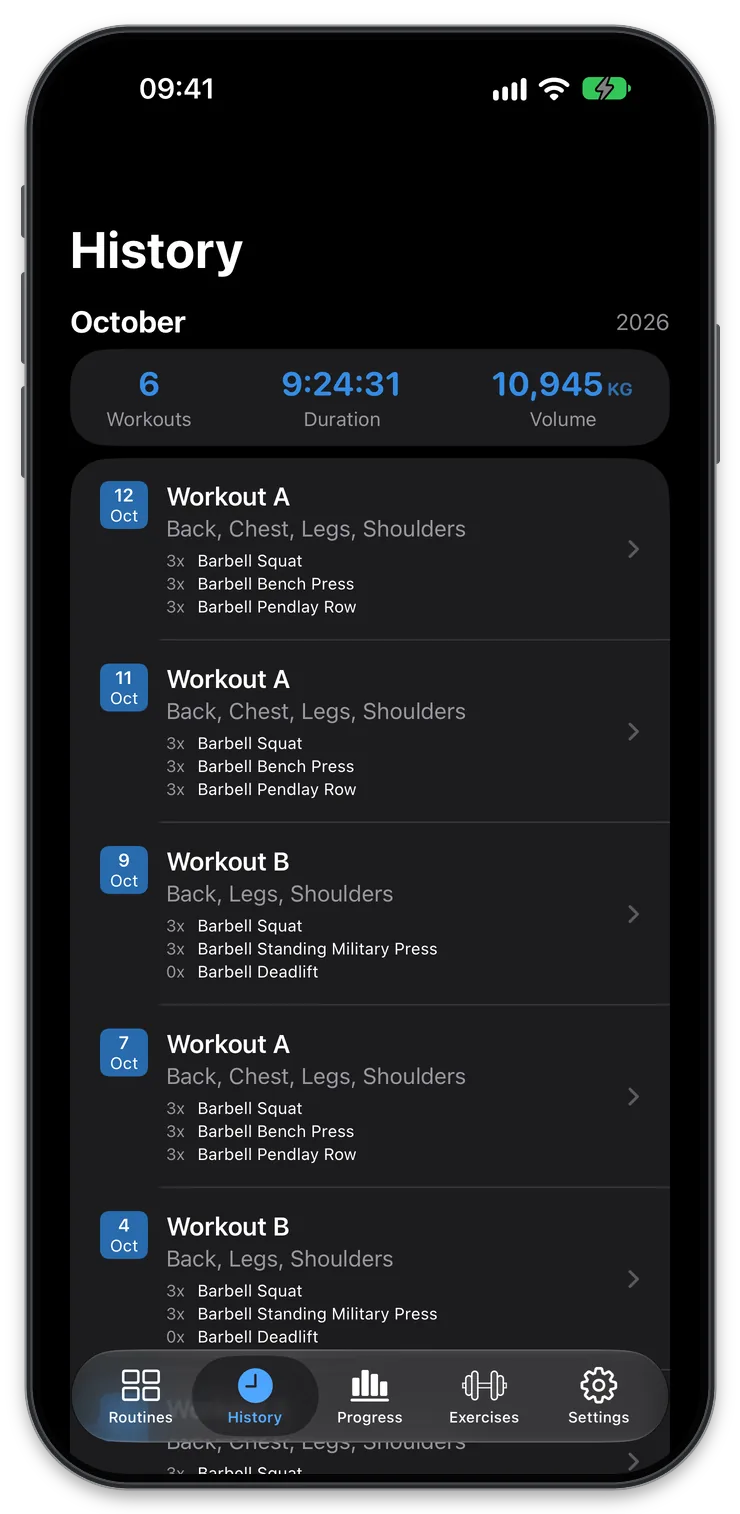
An app to track workouts, not just time at the gym
Being at the gym and knowing what you did there are different things. A workout tracker records the exercises, sets, repetitions and weights behind each session, so you can return to the details instead of relying on a vague memory.
Liftlog+ works as a gym log for the training you choose. Plan a routine, record the workout and review your history before the next session. That simple cycle is useful whether you train a few familiar exercises or follow a structured split.
This is strength-workout tracking rather than GPS route tracking or calorie counting. The useful record is the work you actually perform.
Before training: give the session a starting point
Create a routine with your planned exercises and targets. A reusable template saves you from entering the same structure from scratch and helps keep exercise names consistent across weeks.
If you already follow a program, mirror its sessions rather than trying to redesign everything around the app. If you are just beginning, choose a manageable routine and focus on learning the logging habit. The beginner lifting guide explains how to keep that first setup small.
Before starting, check the previous comparable session. Seeing the last recorded weights and repetitions gives you context for today’s plan. It does not mean you must beat every number; it simply makes the decision better informed.
During training: record the result while it is fresh
Log each set close to when you complete it. Waiting until the end of a long session makes it easier to forget a changed weight or confuse the repetitions from two similar exercises.
A practical workout record contains:
- The correct exercise or variation.
- The weight and completed repetitions for each set.
- A short note when something changes that affects comparison.
If you complete fewer repetitions than planned, record the actual number. If you substitute a dumbbell bench press for a barbell movement, log the dumbbell exercise. Accuracy is more valuable than making the session match the template.
Liftlog+ Pro on iOS adds workout and exercise notes and set-by-set RPE logging. Rest timers are also available; check the app’s current purchase options for their included features. Use the details that serve your training rather than adding data simply because a field exists.
After training: leave yourself a usable record
Take a moment to check that the completed workout reflects what happened. A mistaken load or an exercise left under the wrong name can make later charts and comparisons confusing.
For a routine-based workout, also review Update Set Weights on the completion summary. Turn it off if today’s changes should not carry into your routine targets; the workout planner guide explains the behavior.
Then let the history do its job. You do not need to analyze every session immediately. A clear record can wait until you are preparing the next workout or reviewing the week.
Notes are particularly useful for one-off changes: a different machine, a shortened session or a variation introduced by your coach. Keep them brief and specific. “Different cable station” will often be more useful later than “strange workout.” For more examples, see keeping a gym diary.
Use your workout history to spot patterns
A gym log becomes more useful as repeat sessions accumulate. You can see which routines you actually complete, how an exercise develops and whether a change in your plan is showing up in your training.
Separate consistency from performance. Returning to regular sessions is one kind of progress; increasing repetitions at a familiar load is another. Neither requires every workout to be a personal best.
Exercise history and charts provide a view of the recorded data, but context still matters. A different movement or a shorter range of motion can change the numbers. Use the log as evidence for a review, not as a score that decides whether a workout was worthwhile.
Workout tracker questions
Why use a workout tracker instead of a notes app?
A notes app can work well if you use it consistently. A dedicated tracker adds a repeatable structure for exercises and sets, reusable routines and exercise-specific history. The advantage is easier organization and review, not that plain text is inherently wrong.
What should I track first?
Start with exercises, weights and completed repetitions. Add context when it helps you understand the session. Once that is consistent, decide whether effort ratings or additional notes improve your decisions. A smaller accurate record beats a detailed record you stop maintaining.
Can I track a workout that differs from my routine?
Yes. Treat the routine as the plan and record what you actually perform in the workout. Equipment substitutions and changed repetition totals belong in the record rather than being hidden to preserve the original targets.
Does a workout tracker guarantee progress?
No. Training choices, recovery, consistency and other factors affect results. Tracking helps you understand what you did and make more informed decisions. For reviewing load and repetitions together, read the strength training guide.
Exercises to explore
More ways to use Liftlog+
Download for Free!
Plan & track your gym workouts with Liftlog+ and stay motivated.
Free to download with optional in-app purchases. Notes and RPE logging require Liftlog+ Pro on iOS. Features and prices vary by platform.